

Ship-Track Forensics: Verify Viral Port and Ferry Videos in Minutes
A citizen journalist’s guide to using AIS vessel trackers to confirm ship incidents, port accidents, and bridge collisions
Viral ship videos are everywhere, from ferry near-misses to cranes collapsing at busy ports. When seconds matter, you can verify a ship incident fast using AIS vessel trackers like MarineTraffic and VesselFinder. This guide shows citizen journalists how to match a clip to a specific vessel’s position, time, speed, and course, so you can confirm or debunk port accidents, bridge collisions, and on-water disasters in minutes.
Why vessel tracking belongs in your verification toolkit
Automatic Identification System, or AIS, is a safety and collision-avoidance technology that broadcasts a ship’s identity and position. Commercial vessels and many large passenger ships are required to transmit AIS. The signals are picked up by coastal receivers and satellites, then displayed on public maps with playback timelines.
What AIS is: The United States Coast Guard explains the system and its data fields, including MMSI, callsign, heading, and rate of turn. See the USCG overview: https://www.navcen.uscg.gov/ais
Who mandates it: The International Maritime Organization sets carriage requirements under the SOLAS Convention. Details from IMO: https://www.imo.org/en/OurWork/Safety/Pages/AIS.aspx
For citizen journalists, AIS is a near real-time source that can corroborate a clip’s location and time. It can also identify the exact vessel and reveal useful metadata like destination, draught, and recent maneuvers.
Tools that make it easy
You do not need specialized software to start.
MarineTraffic: https://www.marinetraffic.com
VesselFinder: https://www.vesselfinder.com
Both platforms offer free maps, vessel searches by name, IMO, or MMSI, and basic playback to see historical tracks. Paid tiers add more history and higher granularity, but for breaking verification, the free views are often enough.
Supporting tools help you cross-check context:
Weather and wind at time of incident: https://www.windy.com
US tides and currents: https://tidesandcurrents.noaa.gov
Ship photo databases to confirm livery and silhouette: https://www.shipspotting.com
MMSI and identity basics from USCG: https://www.navcen.uscg.gov/mmsi
A real-world example: Baltimore’s Key Bridge collapse
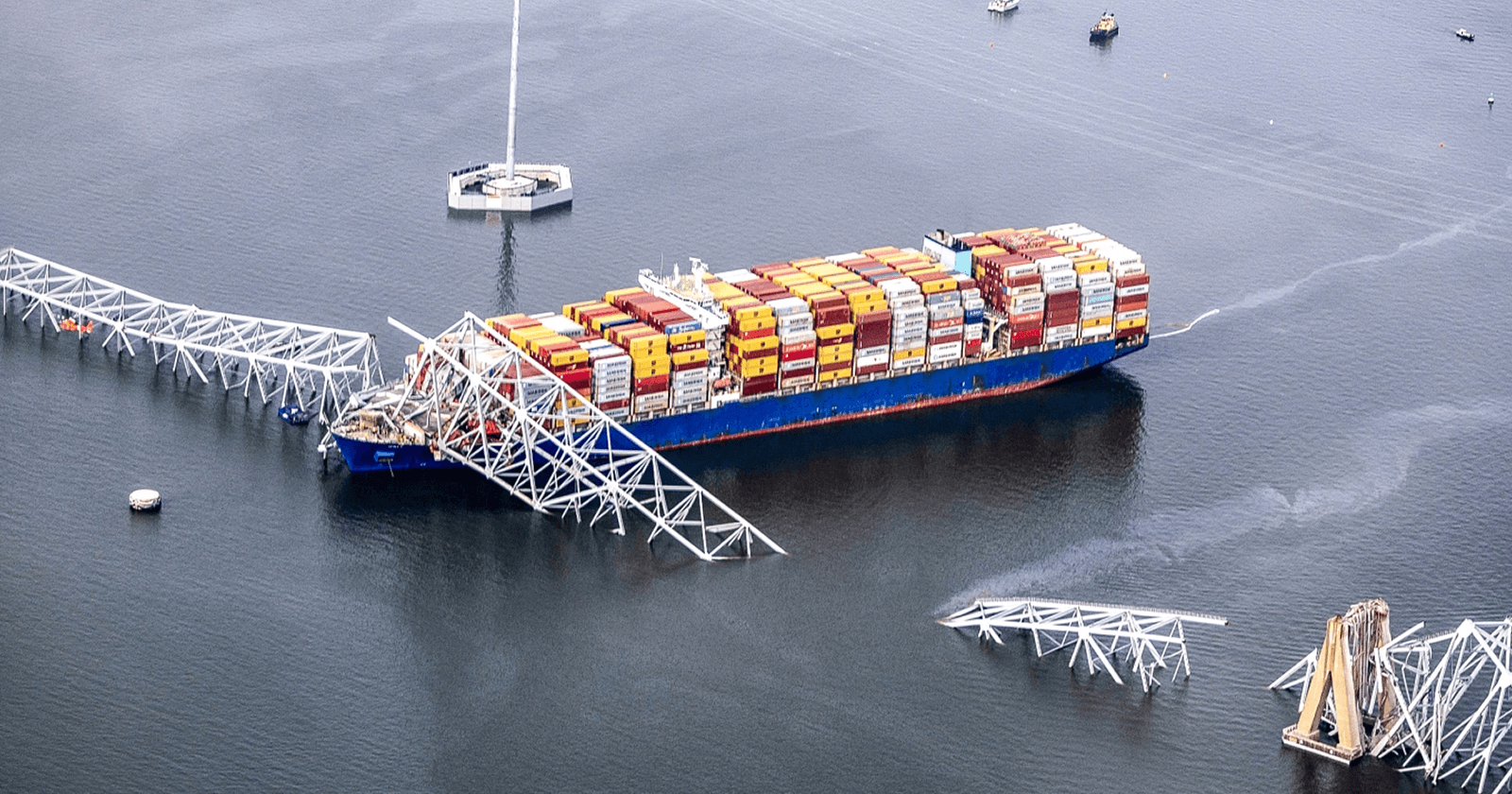
On March 26, 2024, the container ship Dali lost power and struck a support of the Francis Scott Key Bridge in Baltimore, causing a catastrophic collapse. Newsrooms and independent OSINT researchers quickly used AIS playback to document the ship’s course and speed before impact, matching the timeline to citizen videos and emergency radio audio.
New York Times visual investigation with AIS track and synchronized footage: https://www.nytimes.com/interactive/2024/03/28/us/baltimore-bridge-collapse-ship.html
NTSB investigation docket page for DCA24MM017: https://www.ntsb.gov/investigations/Pages/DCA24MM017.aspx
The lesson is not about one city. It is that AIS data anchors viral clips in time and space, which makes your reporting faster and more credible.
Step-by-step: verify a viral ship video
Here is a simple workflow you can run in a few minutes.
- Capture every clue from the clip
Freeze frames. Look for a ship name on the bow or stern, a company logo on containers or funnel, colors on the hull, or a ferry route sign at the dock.
Scan the shoreline. Bridges, cranes, lighthouses, pier numbers, and skyline profiles are all geolocation gold.
Note the environment. Day or night, sun angle, rain or fog, waves, and wind direction. Ambient audio often captures horns, sirens, or PA announcements that can signal a port or ferry line.
- Identify the vessel candidate
Search MarineTraffic or VesselFinder by ship name. If the name is unclear, try partial strings or filter by ship type and region.
Prefer unique IDs. MMSI and IMO numbers are less ambiguous than names. You can sometimes read them on the stern in high resolution, or find them in photos on ShipSpotting once you have a likely name.
- Play back the track for the time window
Open the vessel’s past track for the date of the clip. Free tiers often show recent hours or days.
Match the key moments. Look for a sharp course change near a bridge, a speed drop at a pier, or a turn in a channel that matches what the clip shows.
Watch SOG and COG. Speed over ground and course over ground numbers should align with what you see. A vessel drifting with low SOG and erratic COG may indicate loss of power or control.
- Lock in the clock
Check the map’s timezone. Most trackers display UTC by default. If the clip has a local timestamp, convert it to UTC or switch the platform to local time.
Sync with external signals. Use Windy for historical wind and precipitation, and NOAA tides for water level context. If the clip shows heavy rain or a specific tide level, the tracker time should match those conditions.
- Cross-check with secondary sources
Scan for more angles. Search by port name plus “live cam” or “webcam,” or scan social platforms for the location. Webcams often show the same moment from a fixed perspective.
Confirm the hull geometry and livery. Compare your frame grabs with recent ship photos to ensure you have the right vessel, not a sister ship with a similar paint scheme.
Look for official notices. Ports and coast guards often post incident notices quickly. Even a brief statement can confirm the location and time window you have already reconstructed.
- Document your verification trail
Save a screenshot of the AIS track with time and position.
Note the vessel’s MMSI, IMO, callsign, and the exact timestamps you used.
Keep links to any corroborating posts or cams. This makes your verification transparent and repeatable.
What AIS can tell you at a glance
When you open a vessel page, these fields are your fast friends:
MST trio: MMSI, ship name, and type. Confirm all three align with the clip.
Dimensions and draught: A high-stacked container ship will look and handle differently than a low-draught ferry.
Destination and ETA: If a clip claims a ship was bound for Port B but AIS shows it arriving at Port A, that is a red flag.
Recent port calls: Useful when multiple videos of similar ships are circulating from different cities.
Pitfalls, blind spots, and how to avoid them
AIS is powerful, not perfect.
Coverage gaps. Coastal receivers and satellites do not see everything in real time. Expect delays in congested harbors or narrow channels.
Free-tier latency. Public maps sometimes lag several minutes. Build in a tolerance when matching timestamps.
Name twins. Different ships can share similar or identical names. Always confirm with MMSI or IMO.
Spoofing and errors. AIS spoofing exists, and transponders can report wrong data. This is rare in routine port operations, but it is another reason to triangulate with visual evidence and weather.
Perspective traps. Long lenses compress distance on the water. An apparent near-miss might be safe separation. Use the track and scale to reality check a dramatic angle.
Safety and ethics on the waterfront
Ports are industrial sites with real hazards. Film from public, safe locations that do not interfere with operations or emergencies. In the United States, drones near ports can face airspace restrictions and facility rules. Check the FAA’s guidance for recreational flyers and airspace awareness before flying: https://www.faa.gov/uas/recreational_fliers/where_can_i_fly
Respect privacy and do not film identifiable victims without consent in the aftermath of an incident. If first responders ask you to clear a safety perimeter, step back and keep rolling from a lawful distance.
Make your footage easy to verify and license
Small choices help newsrooms and investigators trust what they are seeing.
Start wide and hold a steady 10 to 15 seconds before you zoom.
Include anchored landmarks like bridge pylons, pier numbers, or distinctive cranes.
Let the ambient audio run. Horns, sirens, and announcements often confirm place and time.
If safe, record a quick second clip that states the location, date, and approximate time as a voice slate.
Keep the original file. Avoid editing or re-encoding before you share. Originals preserve metadata and best quality.
If you want to request footage from a specific dock, ferry terminal, or bridge, POV makes it straightforward. Post a bounty with a map circle and the time window you need. People on the ground can walk into the bounty circle, record the scene, and submit video. You only pay for accepted clips, which encourages clear requests and trusted results.
A 60-second checklist you can save
Extract clues: ship name, hull color, landmarks, weather, audio.
Find the vessel by name, then lock with MMSI or IMO.
Play back the AIS track for the local time window.
Match course, speed, and location to what the clip shows.
Cross-check with weather, tides, webcams, and other angles.
Screenshot your evidence and save sources.
When a port video blows up, the first story is almost never the full story. With AIS, you can turn a viral clip into a verified report and contribute facts to the public conversation, fast.
📬 Be part of what’s next
POV is a citizen journalism app that turns everyday people into contributors. Post a bounty, request video from anywhere in the world, or walk into a bounty circle and get paid for your footage.
Learn more: https://pov.media
Sign up for early access: Subscribe to POV Stories
Follow us: @POVAppOfficial


